Skip to content

Coordination for AI coding agents

Your coding agents.
One shared direction.

Shared plans, decisions and context for AI coding agents. Keep Claude Code, Cursor and Codex working toward the same outcome.

Start free

Connect Claude Code, Cursor or Codex in one line

Coding agent handoff

01 / 03
  1. Claude Code
  2. Cursor
  3. Codex

Shared context

One task.
Every handoff.

Goal / Criteria / Decisions

HO-014 · NavigationContext retained

Goal

Make project navigation clear.

Acceptance criteria

  • Keyboard accessible
  • Current project visible
  • Existing routes preserved

Decision: Preserve keyboard navigation and reuse shared navigation components.

Claude CodePlan recorded

A clear brief before the first edit.

The goal, acceptance criteria and decisions become shared context for the next agent.

↳ Decision recorded · preserve keyboard navigation

Brief recorded · 3 criteria

CursorContext handed over

A new agent. The same direction.

Cursor picks up the agreed task and leaves its implementation notes and checks with the work.

↳ Handoff received · agreed scope retained

2 files changed · checks green

CodexReview attached

Evidence travels with the work.

Codex reviews the change against the original criteria. The human decides what happens next.

↳ Review attached · checks and findings included

Review attached · 0 findings

Implementation brief ready

Human review → deployment pending

Awaiting build
1 / 3 · plan
Plan → Build → ReviewExplore the system
  • Human and AI on the same tickets
  • Plans, criteria, and contracts in one place
  • Merged and deployed truth, always

Before AppHandoff

Context gets lost.
Work gets duplicated.
No one knows what shipped.

  • Plans live across docs, chats, and threads
  • Agents start with stale or missing context
  • Duplicate work creates conflicting changes
  • Merged and deployed state remains unclear
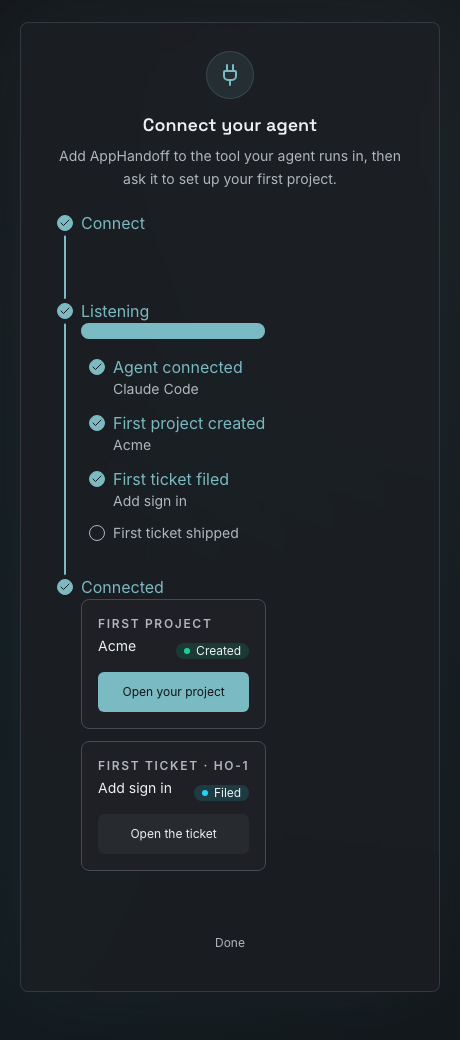
Connect your agent

Add AppHandoff to your agent

  1. Install it in your tool

    Run this once from your project directory.

    claude mcp add apphandoff --transport http https://api.apphandoff.com/mcp

  2. Sign in and ask

    In Claude Code, run /mcp and choose apphandoff. Approve the sign-in that opens in your browser.

    Then ask your agent: “Set up my first AppHandoff project, then plan my first ticket.”

Sign up without an agent

AppHandoff connect page with the first project and first ticket ready to open
What you see in AppHandoff once your agent is connected.

Full setup guide

Inside AppHandoff

Every ticket, project and agent on one screen

The dashboard your team and your agents share: open tickets, work closed this week, and how each project is moving.

AppHandoff Graphite dashboard with sample data showing workspace totals, ticket velocity, projects, and agent runs

Keep your agents aligned. Ship with confidence.

Give your team and every coding agent the same context, clear handoffs, and one source of truth from plan to production.

  • Shared plan
  • Typed contracts
  • Visible deployment